




Never miss a contract deadline again with notifications sent directly to Slack

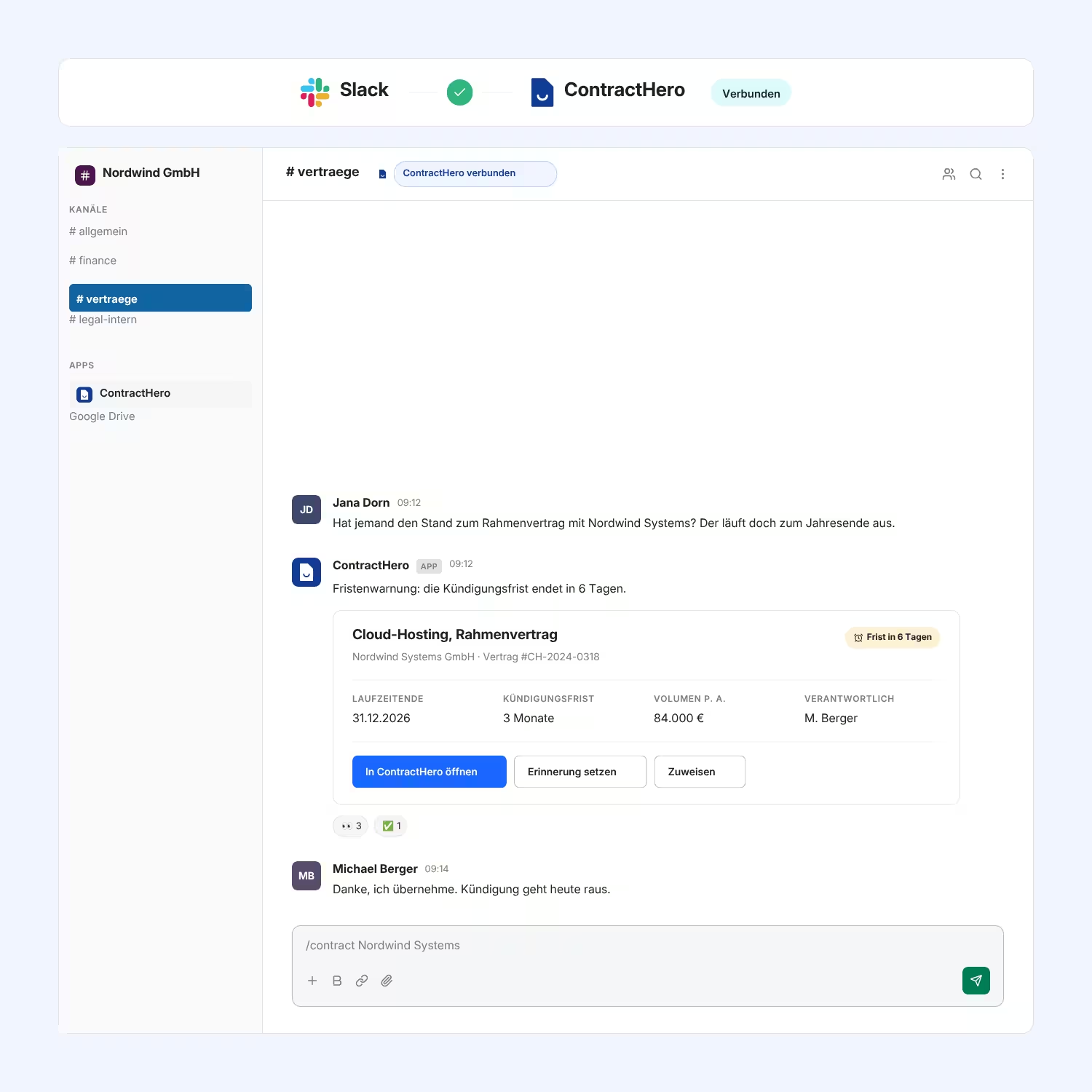
With ContractHero's Slack integration, contract notifications are sent directly to Slack. You can view pending tasks and ongoing signatures with a single command, without having to open ContractHero.

More than 400 companies manage their contracts with ContractHero

The challenge

Contract-related issues get overlooked because no one is constantly checking the system

Contract approvals take place in the chat, while administration happens in a separate system. Anyone who wants to know whether a signature has already been added or which tasks are still pending has to open another tool, log in, and search for the information. So people tend to just ask quickly in the chat channel instead.

As a result, contract progress depends on individual people and their memories. Tasks get left undone because no one has seen them, and when it comes to checking the status of a signature, people tend to ask rather than look it up.

Contract notifications directly in Slack

ContractHero is the central repository for all of your company's contracts, featuring " deadlines," tasks, and signatures—all in one place. The Slack integration brings notifications from ContractHero directly into the channel where your team already works. In addition, two commands answer the most common questions right in the chat, without anyone having to open ContractHero.

How it works in practice

Connect in one step:
You set up the connection in ContractHero. You don't need to search for anything or set anything up in Slack.
Receive notifications:
Tasks, deadlines , and signatures notify you automatically, rather than waiting until you next check the system.
Check Tasks and Signatures:
Two commands in the chat show you which tasks are pending and which contracts are currently being signed.
Book a demo

What exactly can you expect?

Nothing gets left undone

Tasks and deadlines reach your team right where they’re already checking in, rather than making them wait until their next login.

A Straightforward Answer

You can view open tasks and pending signatures with a single command in the chat, without even having to open ContractHero.

Can be controlled at the right spot

You set which notifications appear in Slack in ContractHero—not in two places at once.

No setup required

The connection is established in a single step on the integration page, without having to search for an app in Slack and without an IT project.

What our customers say

“After just two months, the investment in ContractHero had already paid for itself”

Jan Kaeten
Group CFO at The Relevance Group

“Today, we know exactly which contracts are active, which ones are in progress deadlines , and which payments are due and where. This saves us a lot of time and gives us peace of mind.”

Daniel Fischer
Head of Finance at empact

“In our first year, we saved over €100,000 with ContractHero.”

Stefan Truthän
Managing Partner at hhpberlin

"We can now find contracts in less than a minute —ten times faster than before."

Florian Bell
Managing Director at Natsana GmbH

"With ContractHero, we can now answer contract-related questions in under three minutes and save about 100 hours of manual work per year."

Dr. Veronika von Heise-Rotenburg
CFO & Managing Director at Everphone

"With ContractHero, we save about 20% of our legal team's working hours."

Lukas Berg
Legal Counsel at Schüttflix GmbH
Recommendations

Top rated on OMR Reviews, Trusted, G2, and others

Our customers value ContractHero for efficiency, reliability and first-class support.

A clear overview of your contracts in 30 minutes – live in the demo

Book a demo

Frequently asked questions

What can ContractHero's Slack integration do?

It brings your ContractHero notifications to Slack—for example, regarding tasks, deadlines , and signatures. It also includes two chat commands: Use /mytasks to view your open, assigned contract tasks, and /contract-in-signing to see all contracts currently awaiting signatures, including the status of each signer. This way, you can get the most common answers without opening ContractHero.

How is the integration set up?

In a single step on the integration page in ContractHero. You don’t need to search for an app in Slack or set anything up there separately. Because the connection applies to the entire Slack workspace, the person setting it up must have administrator or installation permissions in Slack.

Can I control which notifications appear in Slack?

Yes. You can turn notifications on or off at any time on the notifications page in ContractHero. In Slack, there are no additional settings you need to manage for this.

Does everyone in the workplace receive our contract notifications?

No. Notifications are sent only to Slack users whose email address is associated with an existing ContractHero account. Anyone who does not have a ContractHero account will not receive a notification.

Do I need my own ContractHero account to use the commands?

Yes. Both commands relate to your account: /mytasks shows the tasks assigned to you. Without access, there's nothing to display.

Is the Slack integration included in the price?

The Slack integration is an add-on module and will be activated for your account. Please contact us, and we'll discuss what works best for your team.

What else can I connect to Slack?

ContractHero's webhooks allow you to send events—such as contract creation, approval status, " deadlines " status, or completed signatures—to any endpoint. The Slack integration handles this for you in the most common scenarios, so you don't have to build anything yourself.