


Contracts often end up wherever it’s convenient: in an email inbox, on a network drive, or in a Teams channel. For those already using Microsoft 365, SharePoint provides a platform that enables basic document management. The question that arises is: Is that enough for professional contract management? And how can SharePoint be meaningfully integrated into a specialized system?
This article explains what SharePoint can do in a contract management context, where its limitations lie, and when integrating it with a " contract management " system like ContractHero is the right move.
What is SharePoint, and how does it work in the contract management?
SharePoint is a cloud-based collaboration and document platform that is already in use at many companies as part of Microsoft 365. Companies primarily use it for centralized file storage, cross-team collaboration, and managing access rights. SharePoint is not a standalone contract management system, but it can be used as a document repository for contract documents.
In practice, this means: Contracts are stored in SharePoint libraries, permissions are assigned at the folder or library level, and teams can collaborate on documents. What SharePoint lacks, however, are features such as automatic deadline tracking, multi-client capability, structured searches for clauses, or a comprehensive contract registry. These are precisely the factors that lead to unnecessary manual effort, missed “ deadlines ,” and a lack of transparency regarding the contract portfolio in many companies. Specialized contract management software can provide a targeted solution here.

Create a SharePoint structure in preparation for integration
Before SharePoint can be effectively integrated into an contract management system, a well-thought-out basic structure is required. Anyone who sets up a SharePoint structure without clear folder hierarchies, consistent file naming conventions, and defined libraries risks ending up with an unstructured storage system that limits the benefits of any integration from the very beginning.
A proven initial structure typically looks like this: a central library for active contracts, separate sections for supplier, customer, and employment contracts, and an archive section for expired documents. Standardized metadata should be stored for each category, such as contract type, person in charge, start date, and term.
A well-designed basic structure in SharePoint is a good starting point, but not a prerequisite. ContractHero integrates existing structures and helps you systematically capture, organize, and manage contracts effectively over the long term, regardless of your current situation.
Manage SharePoint Permissions
Contract data is among the most sensitive information a company manages. Not every employee with access to SharePoint should be able to view supplier terms or salary components.
To manage SharePoint permissions, the platform offers granular permission assignment at the level of libraries, folders, and individual documents. Permission groups can be managed centrally through Microsoft 365 Administration. For the “ contract management ,” a role-based model is recommended: read access for business departments, write access for contract managers, and full access for administrators. It is important that permissions are consistently inherited or deliberately overruled. Uncontrolled individual assignments lead to a lack of transparency and create compliance risks that are difficult to trace later on.
Version Control and Document Management with SharePoint
SharePoint includes built-in version control. Every change made to a document is automatically saved, and older versions remain accessible. Document version control in SharePoint is particularly relevant in the field of contracts, where the history of addenda and amendments must be documented in a traceable manner.
You can use the library settings to specify how many versions are saved and whether to distinguish between major and minor versions. The latter is particularly useful when working with contracts: Drafts are stored as minor versions and are marked as major versions only after approval. This makes it easy to track at any time which version of a contract is officially valid and which is still being worked on.
When combined with Power Automate, simple approval workflows can be implemented: A draft contract goes through defined review stages before being marked as a valid version. However, for more complex workflows involving multi-level approvals, reminder functions, and automatic deadline tracking, SharePoint alone is not sufficient. This is where the tangible added value of specialized contract management software like ContractHero becomes apparent.
Synchronize SharePoint and Search Documents
You can sync SharePoint using the OneDrive client so that documents are also available locally. While this is convenient for day-to-day work with contract documents, it often does not address any of the key challenges in the contract management.
Anyone who wants to search through SharePoint documents quickly runs into limitations when it comes to contracts. The built-in search indexes files and enables a simple full-text search, but it cannot analyze clauses in a structured way, does not provide an overview of ongoing deadlines , and does not indicate which contracts are currently in which status. Anyone who wants to know which supplier contracts are set to expire in the next 60 days or which agreements have not yet been countersigned may sometimes find the answer in SharePoint, but only with considerable manual effort and the knowledge of exactly where and how to search.
This is precisely where the difference lies compared to specialized contract management software like ContractHero. Contracts can not only be stored and synchronized, but also actively managed: with structured search queries based on contract content, automatic deadline notifications, and a central dashboard that provides an at-a-glance view of the entire contract portfolio.
When does a SharePoint integration in the " contract management " make sense, and when doesn't it?
SharePoint can play a useful role in the " contract management ," but the key question is what that role is. Companies with a manageable volume of contracts, clearly defined filing processes, and little cross-departmental coordination often find SharePoint to be a suitable filing system. For those who simply want to store documents centrally, synchronize SharePoint, and search basic SharePoint documents, it provides a solid foundation.
The situation changes when compliance requirements increase, multiple departments rely on a shared contract portfolio, or contracts need to be not only stored but also actively managed with deadlines, responsibilities, and approval processes. In these situations, it’s worthwhile to integrate SharePoint with specialized contract management software. Integration with a system like ContractHero does not mean abandoning proven processes: Existing SharePoint structures and permission models are retained but are supplemented by a control layer that SharePoint alone cannot provide.
Integrating SharePoint with ContractHero
ContractHero offers direct SharePoint integration, making it easier for companies to get started with professional contract contract management . Existing contract portfolios from SharePoint can be imported without having to immediately abandon familiar structures. Contracts are managed centrally in ContractHero, while the contract portfolio remains available in SharePoint at the same time. Teams that wish to continue working in SharePoint will not lose their familiar access.
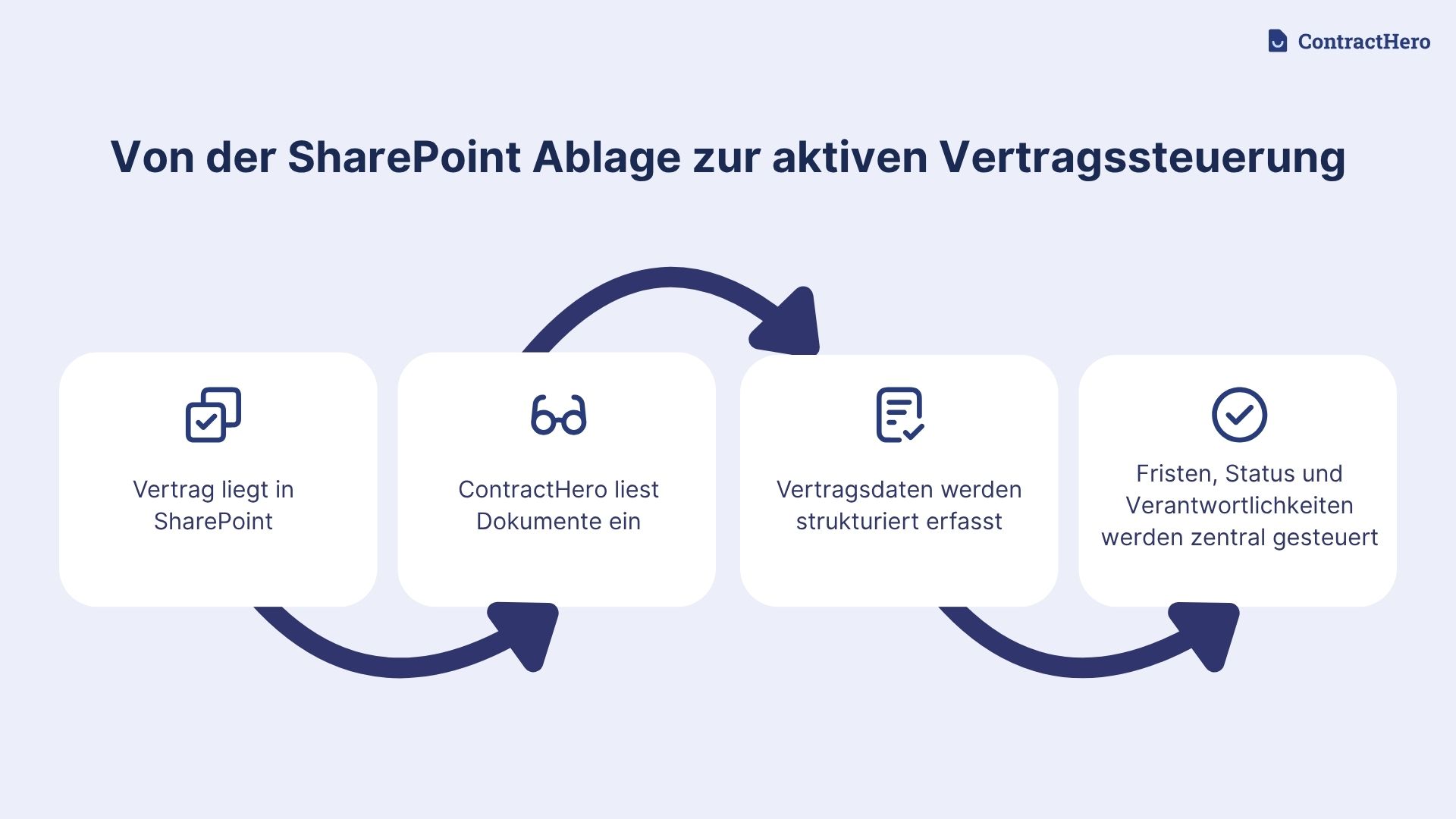
Benefits of Integrating SharePoint with contract management Systems
For companies that are already deeply embedded in the Microsoft 365 ecosystem, integrating SharePoint with specialized contract management software ( contract management) is often the most pragmatic way to manage contracts in a structured manner. The key difference lies in areas where SharePoint alone is no longer sufficient: deadlines, responsibilities, and maintaining an overview of active contracts. ContractHero fills precisely this gap without requiring companies to abandon their existing filing structures. This reduces the initial implementation effort and increases acceptance within the team, as employees can continue working with familiar tools while a significantly more powerful management layer is established in the background.
Integration Security
Even if you’re already using SharePoint to sync documents, you don’t have to compromise on data protection when integrating with ContractHero. ContractHero is ISO 27001-certified at both the server and enterprise levels and is regularly audited by independent auditors. All data is encrypted using TLS during transmission and secured with AES-256 at rest. Customer data is stored exclusively on servers located within Germany and is not used for AI training. For companies with high data protection requirements, this provides a robust foundation, especially when contracts contain personal data or confidential terms.
Conclusion
SharePoint is a proven platform for document storage and cross-team collaboration, but it is no substitute for structured contract management. For those who simply want to store contracts and search through them occasionally, it often works well. However, as soon as deadlines contracts need to be actively monitored, responsibilities clearly assigned, and contract data analyzed across departments, its limitations quickly become apparent.
The most sensible approach for companies already using SharePoint is therefore not a complete system overhaul, but rather targeted integration. SharePoint remains in place as the familiar storage structure, while specialized contract management software— contract management —takes over the control functions that SharePoint does not provide. Existing structures, permissions, and workflows remain unchanged. What changes is the control over the contract portfolio.
.svg)







_BestSupport_QualityOfSupport%20(5).png)




.avif)