


Purchase agreements are stored in SAP, the signed master agreement is a PDF on a drive, the notice period is in an Excel spreadsheet, and the corresponding NDA is in the legal department’s inbox. In many companies, this is exactly the norm. The contract data exists, but it’s scattered across different locations and cannot be analyzed collectively.
This creates a practical problem for Finance, Legal, and Purchasing. It’s difficult to track obligations, deadlines are missed, and responsibilities remain unclear. Those who already use SAP …wonder: What can SAP do for contract management, and when does it need to be supplemented?
This article explains the contract management features offered by SAP, how contracts work in purchasing, the available integration options, and the key considerations for implementation and optimization.
Why Manage Contracts in an ERP System?
Contracts are financial obligations with a specified term. They define prices, quantities, payment terms, and termination dates, and thus have a direct impact on budgets, forecasts, and liquidity. An ERP system maps out precisely this business-related aspect. It tracks suppliers, materials, terms and conditions, purchase orders, and invoices.
So it makes sense to manage contracts in the ERP system. If the master contract is stored in the same place where orders are placed and posted, the agreed-upon prices apply directly, and every order can be reconciled with the contract. Companies use a similar line of reasoning for CRM contract management on the sales side, where customer contracts should be created in close proximity to quotes and orders.
In practice, however, there is a gap. ERP systems are designed for transactions. SAP can store documents but cannot analyze their content. They can tell you what quantity was ordered and at what price, but not which liability clause was agreed upon or who is responsible for the contract’s content. Therefore, clarify early on: Which contracts are associated with a purchase order or a work order, and which are not?
What is contract management in SAP?
In SAP Contract Management, a contract is created as a data record and linked to a purchase order, delivery, and invoice. In the classic ERP components, a contract is therefore not a document, but rather a data record consisting of a document header, line items, terms and conditions, and a validity period.
These objects are primarily modeled in MM (Material Management) for procurement, in SD (Sales and Distribution) for sales, and in RE-FX (Real Estate) for real estate. The signed contract is usually attached as a file via the document management system in SAP or via ArchiveLink.
It is important to distinguish this from contract lifecycle management. Contract management in SAP primarily covers operational execution. Drafting, negotiation, deadlines, and an overview of all contracts: SAP’s standard functionality is limited in these areas.
How does contract management work in SAP?
Contract management in SAP is handled through several components, each of which supports a specific contract type. There is no single application for all contracts. Which SAP contract management modules are relevant depends on where the contract is created in the process.
The core SAP contract management function remains the same throughout. First, the contract is created as a document, specifying the business partner, term, target value or target quantity, and the agreed-upon terms. Purchase orders are then linked to this contract. SAP tracks how much has already been drawn down and shows what remains.
Standard reports and SAP Fiori apps are available for analysis. Control continues to be based on quantity and value, not on the contract text.
SAP ECC vs. S/4HANA
How easy it is to manage this depends on the release version. In SAP ECC, contracts are managed using the standard transactions in the SAP GUI, such as ME31K for creation and ME3L for analysis. The data is complete, but the analysis remains list-based.
SAP S/4HANA uses the same objects but supplements them with Fiori apps such as Manage Purchase Contracts, Expiring Contracts, and Contract-Independent Expenditures. Centralized contracts spanning multiple backend systems are supported by SAP S/4HANA for Central Procurement, and SAP S/4HANA for Enterprise Contract Management is available exclusively here.
For many companies, this is also a matter of timing. SAP has committed to providing mainstream maintenance for SAP ERP 6.0 through the end of 2027; after that, extended maintenance—which comes at an additional cost—will be available through the end of 2030. Anyone planning to migrate during this period should factor the contract terms into their planning right away.
Benefits of Contract Management Software in SAP
The benefits of SAP Contract Management are most evident where the contract and the procurement process are directly linked. In such cases, the contract isn’t just stored in an archive—it also controls purchase orders, goods receipts, and invoice verification.
- Terms and conditions are applied automatically. Prices, pricing tiers, and payment terms specified in the contract take effect upon order placement without the need to look them up manually.
- You can see what has already been used. The system shows what percentage of the target quantity or target value has already been utilized. This makes it easier to monitor the budget and renegotiate.
- Everything in one system. Demand, order fulfillment, goods receipt, and invoice verification all run on the same database.
- Every order can be tracked. Each call-off is linked to the contract, which facilitates internal audits and inspections.
- Analyzable expense data. Contract-related expenses can be analyzed by supplier, product category, or cost center.
However, these benefits apply only to ERP-related contracts. For all other agreements, the picture remains incomplete. This is where document analysis comes in: it extracts the most important data directly from the contract.
SAP Contract Management in Purchasing
In Purchasing, SAP models framework agreements. “Framework agreement” is the umbrella term that encompasses two document types: the contract and the scheduling agreement. The contract specifies, on a long-term basis, which materials or services a supplier will provide, while the scheduling agreement supplements it with fixed delivery dates and schedule lines. The contract comes in two forms:
In a volume contract, a target volume is agreed upon for each position. The contract is considered fulfilled once this volume has been reached through call-offs. In a value contract, a target value applies to the entire contract, regardless of which positions are ordered.
Calls for delivery are made based on purchase orders that reference the contract. For companies with multiple plants, contracts can be concluded centrally. The plant is not specified until the call for delivery is made; plant-specific terms and conditions are possible. Those who operate multiple ERP systems use central contracts from SAP S/4HANA for Central Procurement for this purpose. Reports are available for monitoring purposes, such as those on expiring contracts, unused contracts, and contract-independent expenditures—that is, purchase orders for which a contract exists but was not used.
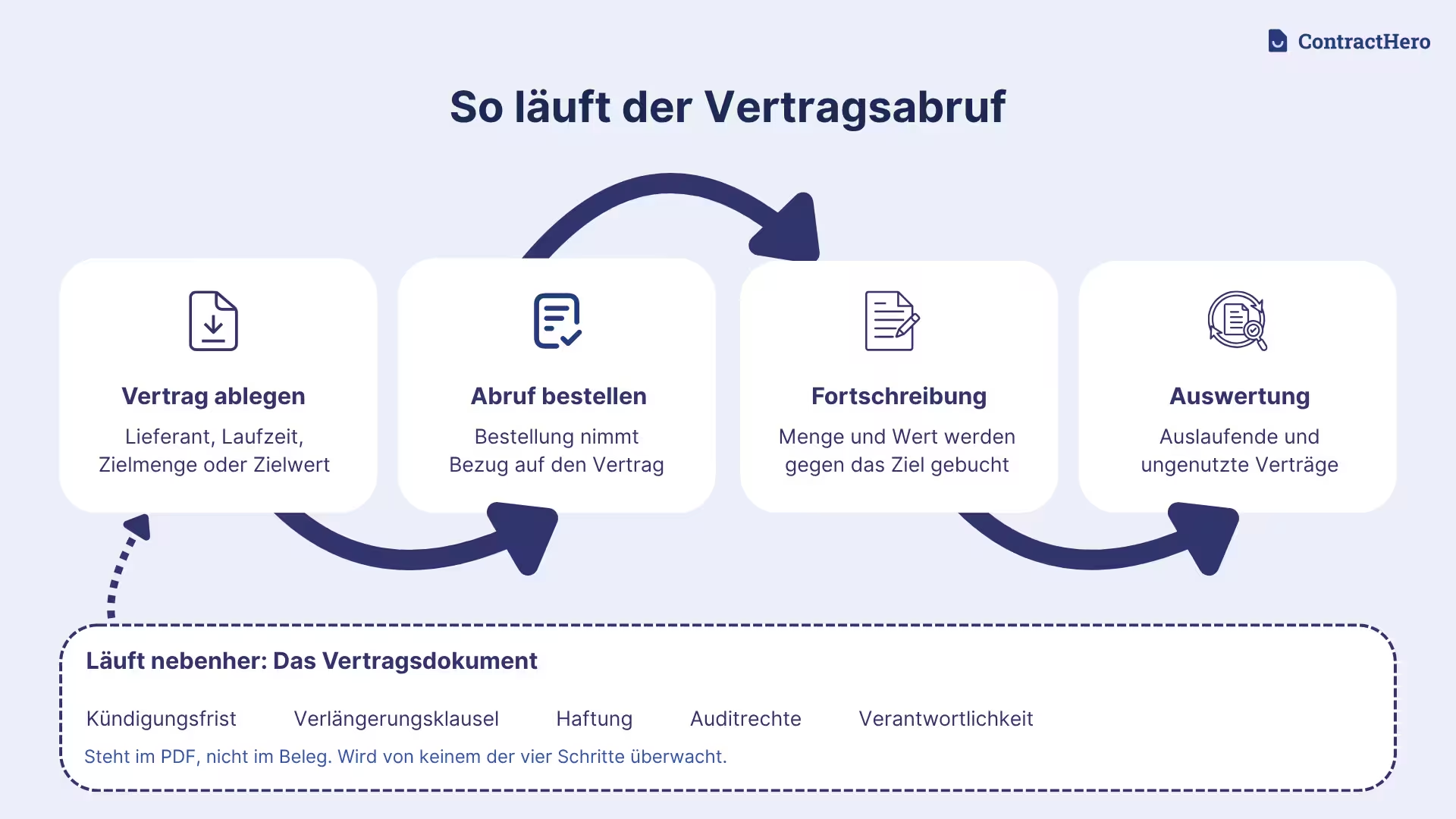
This works well for purchasing. Things get complicated when it comes to the content of the contracts. Notice periods, renewal clauses, service levels, and audit rights are specified in the contract itself, not in the supporting documentation. Yet it is precisely these points that often determine whether a contract is terminated or renegotiated in a timely manner.
SAP Contract Management in Sales
On the sales side, SAP applies the same logic, only from the opposite perspective. The customer contract in the SD module is a framework agreement with a customer regarding quantities, values, or services. Here, too, there are quantity contracts and value contracts, supplemented by maintenance and service contracts for recurring services.
Call-offs are processed through orders that refer to the contract. The system updates the called-off quantity or value and displays the extent to which the agreement has been utilized. This serves as the basis for Finance to evaluate recurring revenue and outstanding contract volumes.
The terms are the same as for purchases. The term and renewal date are listed on the receipt, while the cancellation policy and liability clause are included in the signed contract.
SAP Contract Management for Real Estate
Rental, lease, and management contracts are managed in SAP using Flexible Real Estate Management, or RE-FX for short. The real estate contract is treated as a separate object and is linked to the master data hierarchy consisting of the business entity, building, and rental object.
RE-FX is more closely aligned with day-to-day contract management than MM and SD. Terms such as base rent and utility costs are posted periodically; rent adjustments can be modeled using index or sliding-scale rules; and utility costs are billed using predefined allocation keys. Notice periods and option periods are also stored as dates.
However, this applies only to real estate. A software contract or an insurance policy cannot be managed effectively in RE-FX, and the contract text itself remains an attached file in these cases as well.
SAP Contract Management Integration
Anyone who wants to integrate contract management into SAP is linking two things: the data in the ERP system and the contract file, which includes documents, clauses, deadlines, and responsibilities.
Contract management with SAP integration, then, doesn't mean forcing everything into one system, but rather seamlessly connecting both sides.
Three methods have become established for this connection:
- Standard integration within the SAP ecosystem. SAP Ariba Contracts can be integrated with SAP S/4HANA using preconfigured scenarios, enabling contracts and procurement processes to work together seamlessly.
- API-based integration of contract management software. Contract header data, supplier numbers, contract terms, and values are exchanged via OData or REST interfaces. Contract and supplier numbers link the data across both systems.
- Middleware or integration platform. The SAP Integration Suite on the SAP Business Technology Platform—or another integration layer—translates data between systems and catches errors when multiple systems are involved.
Before proceeding with technical implementation, three questions should be clarified: Which system manages which data? In which direction does synchronization occur? How are changes handled? For each data field, specify which system manages it. The ERP system remains the primary source for supplier and order data, while the contract management software handles documents, deadlines, clauses, and responsibilities. This creates a shared data foundation without the need to maintain duplicate information.
SAP Contract Management Implementation
An SAP Contract Management implementation is less of a technical project and more of an organizational one. The greatest effort is usually required when dealing with contract types, master data, and responsibilities.
The Panorama Consulting Group’s ERP Report 2026 supports this: With a median project duration of nine months, more than a quarter of the 170 companies surveyed exceeded their budget, and just under a quarter went over schedule. The report cites organizational issues such as governance, process design, and resistance to change as the most common causes.
It's best to proceed step by step:
- Compiling Contracts: Identify the types of contracts that exist within the company, where they are located, and the volume involved.
- Determine what belongs in SAP: Decide which contracts should be managed in the ERP system and which are better kept in a central contract file.
- Prepare master data and structures: Define document types, number ranges, condition types, product groups, and organizational units.
- Define roles and permissions: Determine who creates, approves, views, and modifies contracts. Approval strategies map out approval workflows within the system.
- Migrating existing contracts: Record existing contracts, add metadata such as term, notice period, and responsible parties, and assign documents.
- Pilot and Rollout: Start with one area, evaluate the results, and then expand.
- Training and Operations: Involve the relevant departments and define responsibilities for ongoing maintenance.
One aspect is often overlooked: Not everyone involved works in the ERP system. Colleagues in HR, Marketing, or Legal need access to contracts without having an SAP license or the necessary experience with the system. If this need isn’t addressed, contracts quickly end up back in folders and Excel spreadsheets.
Optimizing Contract Management in SAP
Once you get started, one thing matters above all else: clean data. Only then will the analyses be accurate. Optimizing contract management in SAP is all about consistently leveraging existing data and filling in the gaps.
Effective starting points include:
- Process more orders through contracts: Identify orders not covered by a contract and transfer them to existing framework agreements.
- Review unused contracts: Carefully evaluate agreements that have not been activated, and terminate or renegotiate them as appropriate.
- Manage deadlines in a structured way: Set notice periods and extension deadlines with clear responsibilities and timely reminders.
- Check data regularly: Review terms, contact persons, and conditions on a regular basis to ensure that analyses remain reliable.
- Establish key metrics: Report regularly on contract volume, utilization rate, the number of contracts expiring, and the processing time until signing.
Using these metrics, you can report on contract coverage every quarter, rather than estimating it just once.
Conclusion: Effectively Combining SAP and Contract Management
SAP reliably maps the business aspects of contracts. Through MM, SD, and RE-FX, contracts are directly linked to Purchasing, Sales, and Real Estate Management. This provides a solid foundation for contract execution.
However, not all contracts end up in SAP. Non-disclosure agreements, insurance policies, software subscriptions, and service contracts not related to purchase orders are excluded. This also applies to the content included in the contract text: deadlines, renewal mechanisms, liability, and responsibilities.
In practice, this means that the question is rarely whether to use ERP or contract management software, but rather how the two work together. SAP remains the leader in procurement and accounting, while a central contract file supplements documents, deadlines, and responsibilities.
This is exactly where ContractHero comes in. All contracts are stored in one place, and key data is automatically extracted. Reminders are set for deadlines, and clear responsibilities are assigned. Even colleagues without SAP access can view the contracts they need. This information can be integrated with existing systems via APIs. You can find an overview of the packages in the pricing overview, and more detailed information in the articles on digital archiving and digitization in contract management.
.svg)





_BestSupport_QualityOfSupport%20(5).png)



.avif)